


Access clear and practical answers to common questions regarding Mobeye products and applications. This FAQ section provides guidance to support the setup, use, and management of Mobeye solutions, with a focus on efficient operation and sustained performance.
Find answers to customer service questions in our customer service FAQs.
How can we help you?
Quick Answers
User manuals are available on each product page, under the Downloads tab. Older versions are available at our company website.
We recommend using Varta, Panasonic, or Energizer batteries. Please avoid Duracell and Philips, as these may affect performance.
For more information on battery placement and the reasons behind our recommendation, see Which battery brand is best for Mobeye products?
For step-by-step instructions on inserting a SIM card into your Mobeye CM4 device, see How to insert a SIM card in my Mobeye CM4 Series device?
Standard Mobeye devices use a 4G CAT-1 communication module with 2G fallback. These standard models are compatible with mobile networks in the EMEA (Europe, the Middle East and Africa), APAC (Asia-Pacific), and LATAM (Latin America) regions, but they are not compatible with networks in the United States or Canada, where a different hardware configuration is required.
MobeyeStore offers dedicated models equipped with CAT-1 WW modules, specifically configured for North American mobile networks. These models are available at an additional cost.
For more information, read our Mobeye US/Canada Connectivity: CAT-1 WW Compatibility Guide.
No. Mobeye devices communicate via the mobile network using an integrated communication module and SIM card. They do not require a Wi-Fi or Ethernet connection.
Not always. Many Mobeye devices operate on batteries for long periods, while others can be powered externally or support both battery and external power. The available power options depend on the product model.
Some Mobeye products are designed for indoor use only, while others are suitable for outdoor installation or are available with an optional extra outdoor housing.
Setup and programming
The Mobeye products we sell on this website are designed for straightforward DIY installation. No wiring expertise or professional installer is required. Detailed installation and programming instructions are provided in the included user manual.
Yes. Since Mobeye devices connect over the mobile network rather than a fixed line, you can relocate them freely. You’ll just need to update your contacts and settings for the new location if needed.
This depends on how your device is powered. For remote programming, it is strongly recommended to use the Mobeye device in combination with the Mobeye Portal. For standalone, battery-operated units, limitations apply. For a full explanation of the available options, read How can I remotely programme my Mobeye device?
You will find detailed instructions in the included user manual.
Alarm notifications
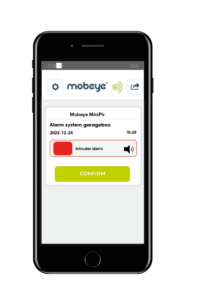
Depending on the product configuration, alarms can be sent by push notification, telephone call, SMS, email, or a combination of these methods.
Yes. Mobeye devices can notify multiple contacts. Depending on the product and configuration, alarms can be sent simultaneously or according to an escalation schedule. With the escalation plan, the first contact is notified, and if they confirm the push message, no one else is notified. If they don’t confirm within the set time, the next contact is notified. If no one confirms, the device places a phone call.
Inputs and outputs
Most Mobeye CM products have two NO/NC alarm inputs. NO stands for Normally Open and NC stands for Normally Closed, referring to the default state of the contact before it triggers. You can connect a range of sensors and external devices to these inputs. For more information, refer to this documentation.
Mobeye devices use one of two output types: an open-collector output or a relay output. Which type your device has depends on the specific model.
No. Only some Mobeye devices include an output. Check your device’s specifications to confirm whether yours has one.
An open-collector output is an electronic switch, suitable for low-voltage signals and triggering other electronics. A relay is a mechanical switch capable of handling higher-voltage circuits, and is electrically isolated from the device itself. For more information on open-collector outputs, read Open Collector Output on Mobeye Devices. For more information on relay outputs, read Relay Output on Mobeye Devices.
Troubleshooting FAQ
There are several practical steps you can take to improve mobile signal strength and ensure reliable delivery of alarms and notifications. For an overview of quick fixes and longer-term solutions for locations with poor coverage, see How to improve mobile signal for alarm system.
There are three common causes. First, confirm the device is in programming mode, check the manual if needed. Second, make sure the command is formatted correctly: 1111 SETTING:VALUE – default code 1111, a space, the setting name, a colon, immediately followed by the value. Third, and most commonly overlooked: check that your phone’s SMS encoding is set to GSM alphabet, not Unicode. Go to your SMS app settings and switch to GSM alphabet if it isn’t already selected. See the full guide for details.
False alarms are usually caused by sudden changes in infrared radiation from sources other than humans, such as direct sunlight, heating systems, air currents, or animals moving within the detection zone. Positioning the sensor away from these sources reduces the risk. The Mobeye Outdoor CMVXI-R uses Digital Double Layer Detection, which requires motion to be confirmed across two detection layers before triggering an alarm, significantly reducing false alarms. For a full explanation, read What is a PIR sensor?
Possibly. The Mobeye SIM/Portal service provides a multi-provider telemetry SIM card that automatically switches between available networks, keeping your device running until the last provider in your country discontinues 2G. Compatible with most devices manufactured from mid-2017 onwards.
For more information, read: How to extend the lifespan of your Mobeye 2G device.

How to make a DIY security alarm
The Mobeye CM-Guard CM4000 is the recommended product for solar panel protection. It has two NO/NC inputs, runs on long-life batteries, and communicates over 4G. The full parts list and setup steps are covered in the installation guide: DIY Solar Panel Alarm to Prevent Theft.
The Mobeye CM-Guard CM4000 is the recommended product for this purpose. See the installation guide for setup instructions.
The Mobeye CM4000 detects when your hose reel reaches the end stop and sends an instant alert to your phone, so you can reposition the reel before water is wasted or a section goes unirrigated. It connects to your existing pump relay, hose reel contact, or a position switch, runs on batteries, and requires no software to monitor once set up. For pump control, the Mobeye CM4042 variant can also switch off the pump automatically. See the step-by-step installation guide to get started.
The Mobeye Call-Key MCK400 turns any door, gate, or barrier into a phone-controlled entry point. Authorised users simply call the unit; no app, no key, no answered call. Access rights per number and time window are managed remotely via the online portal. See the step-by-step guide to get started.
Still have questions?
For the latest information on technology and application-related topics, visit the Mobeye.com FAQ page on our company website.
Need hands-on help? Our Product Support page offers detailed documentation, setup guides, and direct support options; everything you need to install, configure, and maintain your Mobeye solution with confidence.