


The shift from analogue telephone lines to IP-based alarm reporting is already underway. In the Netherlands, analogue lines were phased out in 2023. In the United Kingdom, Openreach’s national PSTN and ISDN switch-off is confirmed for 31 January 2027, following a delay from the original December 2025 target.
For security installers and system owners, this has a direct consequence: alarm systems that rely on PSTN diallers to report to an Alarm Receiving Centre will need to be upgraded. IP reporting via 4G is the correct replacement, and the transition is more straightforward than it might appear.
What Is an Alarm Receiving Centre and Why Does IP Reporting Matter

An Alarm Receiving Centre (ARC) is a professionally staffed monitoring facility that operates around the clock. It receives alarm signals, validates them, and coordinates the appropriate response, whether that is contacting a keyholder, dispatching a response team, or alerting the emergency services.
The reliability of this process depends entirely on the communication path between the alarm system and the ARC. Analogue telephone lines provided that path for decades. IP reporting via 4G replaces it with a faster, more resilient connection that does not depend on a working landline.
One indicator of how seriously ARCs treat communication reliability is the mandatory 24-hour test report. If the expected daily test signal is not received, the ARC initiates checks immediately, because a missed test could indicate either a technical fault or a genuine security issue.
The SIA DC-09 Protocol
SIA DC-09 is an industry standard for IP alarm reporting, published by the Security Industry Association. It defines how alarm data is packaged and transmitted between a device and an Alarm Receiving Centre (ARC), allowing equipment from different manufacturers to communicate with the same monitoring software.
How DC-09 IP Alarm Reporting Works
A DC-09 message carries several pieces of information in a structured format: an account number that identifies the site, an event code describing what happened, such as an alarm, restore, test signal or fault, and zone data showing which part of the system triggered the event. The ARC’s receiving software reads this information and routes it to the appropriate operator or automated response, without needing to know which manufacturer’s communicator sent it.
This standardisation enabled IP-based alarm reporting to move beyond older analogue-era protocols. Before IP reporting, many systems used Contact ID, a tone-based signalling protocol designed for telephone lines. It worked reliably, but it was slower, more limited in the amount of information it could carry, and dependent on a working telephone connection. DC-09 was designed for network transport from the outset, allowing it to carry structured event data and support communication with IP-based alarm receivers.
In practice, getting DC-09 reporting working correctly comes down to a handful of details that installers need to configure with the ARC: the account number, sometimes called a PROM number, the correct IP address and port for the ARC’s receiver, and the specific event codes the ARC expects for each type of signal. A mismatch in any of these can result in a system appearing to transmit correctly at the installer’s end while the event never reaches or is correctly interpreted by the control room. This is why ARCs typically require a test period before a system goes live. It allows these configuration issues to be identified and resolved before the system is put into service.
Any IP alarm communicator intended for professional monitoring should support DC-09 when the receiving ARC requires it. Without a compatible reporting protocol, the communicator cannot reliably exchange alarm information with the ARC’s monitoring platform.
How Mobeye Handles IP Reporting to an ARC

Choosing an ARC and understanding the reporting standard is one part of the solution. The other is the on-site device that formats and transmits the alarm signal. This is where the Mobeye CM4100 comes in.
The Mobeye CM4100 connects to the alarm output of an existing system, monitors mains power, and communicates via 4G with 2G fallback. This means it does not require a landline, broadband connection, or fixed infrastructure of any kind.
Alarm data is transmitted through the Mobeye Portal, which forwards messages to the ARC in SIA DC-09 format. A daily test message is sent automatically, satisfying the ARC’s continuity monitoring requirement.
The CM4100 supports two input channels. Zone information from both is merged into a single clear message for efficient processing at the control room.
Private contacts, such as a keyholder, property manager, or additional nominated receivers, can be added alongside the ARC. Both receive alerts simultaneously, with no conflict between the two notification paths.
What Is Not Forwarded to the ARC
It is important to understand the scope of what the CM4100 reports. Only alarm output messages are forwarded to the ARC. Tamper alerts and RF issues require separate consideration and are not included in the ARC reporting path. Discuss this with your ARC when setting up the account to ensure your monitoring arrangement covers all required signal types.
Setting Up ARC Reporting with the CM4100
The setup process involves six steps:
- Connect the CM4100 to the alarm output (relay) of the existing alarm system.
- Power the device with a 12V–24V supply or the supplied adapter.
- Register the CM4100 on the Mobeye Portal using the included Mobeye SIM card.
- Provide Mobeye with the ARC details: the prom number, IP address and port numbers, and the required message codes.
- Mobeye completes the configuration and sends an initial test message to confirm the connection.
- Trigger a test alarm locally, confirm receipt with the control room, then remove the system from test mode.
Regarding the ARC details in step 4: the prom number is your unique identifier at the ARC, assigned when you open an account. The IP address, port numbers, and message codes are provided by the ARC itself. You will need to contact your ARC to obtain these before Mobeye can complete the configuration.
Note that while the Mobeye SIM and portal service include ARC reporting at no additional charge, you must arrange your own account with an ARC independently.
Preparing for the Analogue Switch-Off
If you manage alarm systems that currently report via a PSTN dialler, now is the time to plan the upgrade. The January 2027 deadline in the UK is firm, and ARCs are already operating exclusively via IP in markets where the switch-off has occurred.
The CM4100 is a practical upgrade path: it connects to the existing alarm panel without replacing it, requires no new cabling or broadband connection, and is operational within a single site visit. For installers managing multiple sites, the same device can be configured remotely via the Mobeye Portal.
For sites that do not currently have ARC monitoring but require it, the CM4100 provides a straightforward route to professional monitoring without a full system replacement. See the full alarm communicators range for related products.
Recommended Product
-
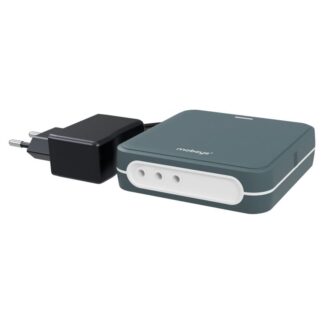
 Outdoor Enclosure (Add-on)Mobeye PowerGuard CM4100 – 4G Power Failure AlarmPrice range: € 215,00 through € 220,00
Frequently Asked Questions
Contact ID is an older protocol originally developed for analogue telephone reporting. SIA DC-09 is its IP-based successor, designed for modern network communication. Most ARCs now require SIA DC-09 for IP reporting, though some accept both. Check with your ARC which protocol they require before specifying equipment.
No. The CM4100 includes a Mobeye SIM card. The portal service and ARC reporting are included, so no separate data contract is required.
Yes. The Mobeye Portal allows you to add private contacts alongside the ARC. Both receive alerts simultaneously when an alarm is triggered.
The CM4100 uses 4G as its primary connection with 2G as an automatic fallback. This dual-network approach reduces the risk of communication failure. The daily test message also serves as a continuous connectivity check. If the ARC does not receive it, they will initiate a fault investigation.
You will need the prom number, the ARC’s IP address and port numbers, and the message codes they use. These are provided by your ARC when you open a monitoring account.
Yes. It connects to the alarm output of an existing panel and operates independently of the panel’s own communication module. This makes it a practical upgrade for systems that currently report via PSTN without requiring a full panel replacement.
The Mobeye CM4100 is a Mobeye product. Read more about Mobeye.